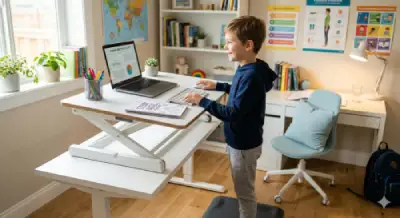
Have you ever felt tired or uncomfortable after sitting at your desk for hours? Whether you’re working from home, studying for exams, or attending online classes, spending too much time sitting can lead to poor posture, neck pain, and reduced productivity.
A riser desk, also known as a desk riser or standing desk converter, is a simple ergonomic solution that lets you switch between sitting and standing without replacing your existing desk. It helps create a more comfortable and flexible workspace for office workers, remote employees, students, teachers, and even children.
In this guide, you’ll learn what a riser desk is, how it works, its key benefits, how it compares to a standing desk, and how to choose the right one for your needs. We’ll also explain whether a riser desk is a good option for kids and how it can support a healthier study environment.
Table of Contents
What is a Riser Desk?
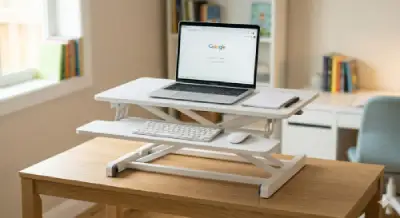
A riser desk, also known as a desk riser, standing desk converter, or sit-stand desk converter, is an adjustable platform placed on top of an existing desk. It allows you to raise your laptop, monitor, keyboard, or books to a comfortable height, making it easy to switch between sitting and standing while working or studying.
Unlike a full standing desk, a riser desk sits on your current table, making it a more affordable and space-saving option. Most models can be adjusted manually, with a gas spring, or electronically, depending on the design.
Using a riser desk helps create a more ergonomic workspace by improving posture, reducing neck and back strain, and encouraging regular movement throughout the day. It is widely used by office workers, remote employees, students, teachers, and anyone who spends long hours at a desk.
Simple Definition
A riser desk is an adjustable platform that converts a regular desk into a sit-stand workstation, allowing users to alternate between sitting and standing without replacing their existing desk.
How Does a Riser Desk Work?
A riser desk works by raising your work surface to a comfortable height, allowing you to switch between sitting and standing throughout the day. Instead of replacing your existing desk, it sits on top of it and lifts your laptop, monitor, keyboard, or other work essentials.
Most riser desks use one of the following adjustment systems:
Manual Adjustment
A manual riser desk is adjusted by hand. It is affordable, simple to use, and ideal for light daily use.
Gas Spring Adjustment
Gas spring models use a smooth lifting mechanism that allows you to raise or lower the desk with minimal effort. These are one of the most popular choices for home and office use.
Electric Adjustment
Electric riser desks use a motor to adjust the height with the press of a button. They offer maximum convenience but are generally more expensive.
No matter which type you choose, the goal is the same: to create a comfortable, ergonomic workspace that encourages better posture, reduces strain, and allows you to alternate between sitting and standing during work or study sessions.
Other Names for a Riser Desk
Depending on the manufacturer or retailer, a riser desk may be listed under different names. Although the names vary, they often refer to the same type of ergonomic product designed to convert a regular desk into a sit-stand workstation.
Some common names include:
- Desk Riser
- Standing Desk Converter
- Sit-Stand Desk Converter
- Adjustable Desk Riser
- Height-Adjustable Desk Riser
- Desktop Riser
- Standing Workstation
- Sit-Stand Workstation
When shopping online, searching with these terms can help you compare more products and find the best option for your needs.
Benefits of Using a Riser Desk
A riser desk offers more than just the ability to stand while working or studying. It helps create a healthier and more comfortable workspace for people who spend long hours at a desk. Whether you’re an office worker, student, remote employee, or parent helping your child study, a riser desk can provide several benefits.
Improves Posture
A properly adjusted riser desk keeps your monitor at eye level, helping you maintain a natural posture and reducing the habit of slouching.
Reduces Neck and Back Strain
Switching between sitting and standing helps reduce pressure on your neck, shoulders, and lower back, making long study or work sessions more comfortable.
Encourages More Movement
Instead of sitting for hours, a riser desk makes it easy to change positions throughout the day. Regular movement supports better comfort and overall well-being.
Increases Focus and Productivity
Many people find that alternating between sitting and standing helps them stay more alert, focused, and productive during work or study sessions.
Saves Space and Money
A desk riser sits on top of your existing desk, so you don’t need to buy a completely new standing desk. It’s a cost-effective way to create a flexible workspace.
Suitable for Different Users
A riser desk can be used by office workers, remote employees, students, teachers, and even children when adjusted to the correct height and used under adult supervision.
How a Riser Desk Improves Focus and Learning
Using a riser desk can help create a more active and comfortable work or study environment. Alternating between sitting and standing encourages gentle movement, which may help some people stay engaged during long periods of reading, studying, or computer work.
Here are some ways a riser desk can support focus and learning:
Better Blood Circulation
Changing positions regularly encourages healthy blood flow, helping reduce the discomfort that can come from sitting in one position for too long.
Improved Comfort
When your monitor and keyboard are at the correct height, it’s easier to maintain good posture, which can reduce neck and shoulder strain during long study or work sessions.
Fewer Distractions
A comfortable workspace allows you to focus more on your tasks instead of constantly adjusting your sitting position.
Supports Healthy Study Habits
For students and children, using a riser desk along with regular movement breaks can help create a healthier daily study routine. Parents should encourage children to alternate between sitting and standing rather than standing for long periods.
Tip: For the best results, switch between sitting and standing every 30–60 minutes instead of staying in one position all day.
Riser Desk vs Standing Desk vs Traditional Desk
Choosing the right desk depends on your budget, available space, and how you work or study. Here’s a quick comparison to help you understand the differences.
| Feature | Traditional Desk | Riser Desk | Standing Desk |
|---|---|---|---|
| Height Adjustable | ❌ No | ✅ Yes | ✅ Yes |
| Uses Existing Desk | ✅ Yes | ✅ Yes | ❌ No |
| Easy to Move | ✅ Yes | ✅ Yes | ❌ Usually No |
| Cost | Low | Medium | High |
| Space Saving | ✅ Yes | ✅ Yes | ❌ Needs More Space |
| Best For | General Use | Home & Office | Long-Term Ergonomic Setup |
Which One Is Better?
A riser desk is the best choice for most people because it is affordable, space-saving, and easy to use. It allows you to enjoy the benefits of a standing desk without replacing your existing furniture.
If you already have a desk at home or in the office, a standing desk converter (riser desk) is often the most practical solution.
How to Set Up an Ergonomic Desk
Creating an ergonomic desk setup can improve comfort, posture, and productivity whether you’re working, studying, or attending online classes. A few simple adjustments can make a big difference.
According to ergonomic safety guidelines by OSHA, your monitor screen should be positioned directly in front of you at eye level to prevent neck and back strain.
Adjust Your Monitor Height
Place the top of your monitor at or slightly below eye level to help reduce neck strain.
Position Your Keyboard and Mouse
Keep your keyboard and mouse close enough so your elbows stay at about a 90-degree angle while typing.
Choose a Comfortable Chair
Use a chair that supports your lower back and allows your feet to rest flat on the floor or on a footrest.
Alternate Between Sitting and Standing
Use your riser desk to switch positions every 30–60 minutes instead of remaining in one position for long periods.
Improve Lighting
Work or study in a well-lit area to reduce eye strain. Natural light is ideal whenever possible.
Keep Your Desk Organized
A clean workspace helps reduce distractions and makes it easier to stay focused.
Ergonomic Desk Setup Tips for Kids
Children should use a desk and chair that match their height. The screen should be at eye level, and they should take regular movement breaks during homework or online classes. Parents can help by checking their child’s posture and encouraging healthy study habits from an early age.

Here is the detailed article about a child’s health and physical posture. To learn more, visit the link
5 Hidden Habits That Might Be Hurting Your Child’s Posture
How to Choose the Best Riser Desk
Choosing the right riser desk depends on your workspace, budget, and daily needs. Before buying one, consider these important factors:
Height Adjustment
Choose a riser desk with a smooth height adjustment mechanism so you can easily switch between sitting and standing.
Size and Workspace
Make sure the desk riser has enough space for your laptop, monitor, keyboard, and other essential items.
Weight Capacity
Check the maximum weight the riser desk can support, especially if you plan to use multiple monitors or heavier equipment.
Stability
A good riser desk should remain stable at every height without shaking while you type or write.
Build Quality
Look for durable materials such as steel frames and high-quality wood or engineered surfaces for long-lasting use.
Budget
There are excellent riser desks available at different price ranges. Compare features instead of choosing the cheapest option.
Tip: The best riser desk is one that fits your workspace, supports good posture, and is comfortable to use every day.
Are Riser Desks Good for Kids?
Yes, a riser desk can be a good option for children when it is adjusted correctly and used under adult supervision. While standing all day is not recommended, alternating between sitting and standing can help children stay comfortable during homework, reading, or online learning.
Here are a few tips for parents:
Choose the Correct Height
Adjust the riser desk so the monitor is at eye level and your child’s elbows remain at about a 90-degree angle while using the keyboard.
Encourage Regular Movement
Children should switch between sitting and standing every 30–60 minutes and take short movement breaks throughout the day.
Focus on Good Posture
Teach children to keep their back straight, shoulders relaxed, and feet supported while studying.
Make Learning Comfortable
A well-organized study area with proper lighting and a comfortable chair helps children stay focused and develop healthy study habits.
According to health experts at Mayo Clinic, alternating between sitting and standing throughout the day helps prevent stiffness and improves overall posture.”
Remember: A riser desk is a tool to encourage better posture and movement, not a replacement for regular physical activity.
Are There Any Disadvantages of a Riser Desk?
Like any ergonomic product, a riser desk has a few limitations. However, most of these can be avoided by using it correctly.
Standing for Too Long
Standing for long periods without taking breaks may cause leg or foot discomfort. The best approach is to alternate between sitting and standing throughout the day.
Incorrect Height Adjustment
If the monitor is too high or too low, it can lead to neck, shoulder, or back strain. Always adjust the desk so your screen is at eye level and your elbows are comfortably bent.
Limited Workspace
Some desk risers have a smaller surface area than a traditional desk, so they may not be suitable for users with multiple large monitors or a lot of equipment.
Cost
A high-quality riser desk can cost more than a basic desk accessory, but it is usually more affordable than buying a complete standing desk.
The Bottom Line
A riser desk works best when it is adjusted correctly and used as part of a healthy routine that includes regular movement and good posture.
For another useful school essential, check out our guide to the 10 best school backpacks for kids.
Fun Facts About Standing While Studying
- Kids who move while learning are often less bored and more creative.
- Standing up can actually improve a person’s mood and confidence.
- Many of the world’s most successful creators and CEOs prefer standing desks!
FAQ
Q1: What is a riser desk?
A riser desk is an adjustable platform that sits on top of a regular desk, allowing you to switch between sitting and standing without replacing your existing workspace.
Q2: What is a riser desk used for?
A riser desk is used to improve posture, reduce neck and back strain, and create a more comfortable workspace for working, studying, or using a computer.
Q3: What is the difference between a riser desk and a standing desk ?
A standing desk is an entire piece of furniture, whereas a riser desk is an accessory that sits on top of your existing table
Q4: Are riser desks good for posture?
When adjusted correctly, a riser desk helps keep your monitor at eye level and encourages a more natural sitting and standing position.
Q5: How long should kids stand while studying?
It’s best to aim for short bursts of 10–20 minutes at a time rather than standing for hours on end.
Q6: Is a riser desk good for kids?
Yes, it helps children maintain better posture, stay alert, and avoid the physical stiffness that comes from sitting too long.
Q7: Is a riser desk worth it?
Yes. A riser desk is a practical option for people who want the benefits of a standing desk without replacing their current desk.
Q8: Can a riser desk help reduce back and neck pain?
A properly adjusted riser desk may help reduce discomfort caused by poor posture, especially when combined with regular movement and ergonomic habits.
Q9: Can I use a laptop on a riser desk?
Yes. Most riser desks are designed to support laptops, and many can also accommodate a monitor, keyboard, and mouse.
Q10: How often should I switch between sitting and standing?
Many ergonomics experts recommend changing your position every 30–60 minutes instead of remaining in one position for long periods.
Q11: How do I choose the best riser desk?
Look for a riser desk with smooth height adjustment, good stability, enough workspace, strong build quality, and a size that fits your desk and daily needs.
Conclusion
A riser desk is a practical and affordable way to create a healthier, more comfortable workspace without replacing your existing desk. Whether you’re working from home, studying, teaching, or helping your child learn, a desk riser makes it easier to alternate between sitting and standing throughout the day.
While a riser desk is not a complete solution for posture or back pain, using it correctly as part of an ergonomic workspace can help improve comfort, encourage movement, and support healthier daily habits. Choosing the right desk, adjusting it properly, and taking regular movement breaks will help you get the most from your setup.
If you’re considering upgrading your workspace, a well-designed riser desk is a smart investment for both productivity and long-term comfort.
Hello! Do you use Twitter? I’d like to follow you
if that would be okay. I’m undoubtedly enjoying your blog and
look forward to new posts.